Bridging the Air-Gap: A Dual-Repo Strategy for Enterprise Development
- git
- workflow
- enterprise
A practical dual-repository Git workflow for developing locally and delivering code into locked-down enterprise environments.
The Challenge: Security vs. Velocity
In enterprise software development, security is paramount. We often work within “Jump Hosts”, provisioned Windows VMs inside a locked-down Intranet. While this architecture secures the data, it severely hampers the development experience (DX).
Common bottlenecks we faced included:
- Tooling Limitations: Inability to install modern IDEs, plugins, or container runtimes on the remote VM.
- Input Latency: Developing via Windows Remote Desktop (RDP) introduces perceptible input lag, making rapid coding and debugging frustrating.
- The “Straw” Effect: Trying to push a large team’s daily output through a single RDP window creates a massive productivity bottleneck.
The Constraints
Our specific environment has a strict network topology:
- Internal: An Intranet-only GitLab instance, accessible only via RDP.
- No Direct Tunnel: We cannot use SSH tunnels or
git remoteto bridge the local machine and the internal network. - Compliance: Crucially, our contract allows source code to be hosted on our own secure infrastructure for development purposes.
The “Patch-Bridge” Workflow Solution
To reclaim our productivity, we implemented a Dual-Repo Workflow. We treat our local environment as the “Development Factory” and the Intranet environment as the “Assembly Line.”
Here is how we sync them without a direct network connection:
1. The “Outer” Loop (High Velocity)
We set up a self-hosted GitLab instance outside the firewall.
- Workflow: The team develops locally using preferred IDEs such as VS Code and JetBrains, runs local Docker containers, and uses local debugging tools.
- Collaboration: We merge requests and perform code reviews on the “Outer” GitLab. This allows us to move fast with zero latency.
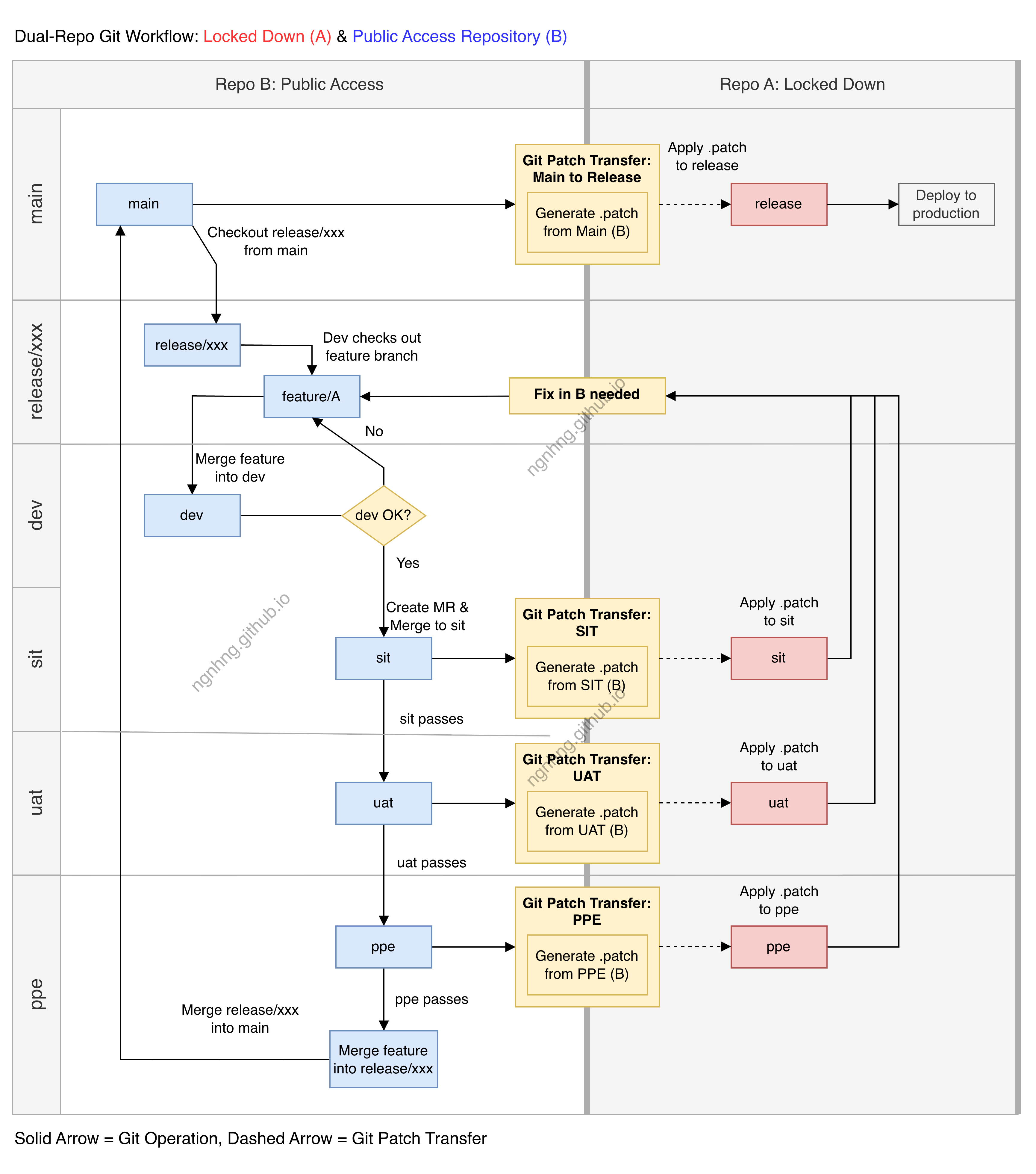
2. The Bridge (The Transfer)
Since we cannot push directly to the internal remote, we use Git’s inherent portability.
- Instead of copying raw files, which risks
CRLFissues and misses metadata, we use Git Patches. - We generate a patch file for the finalized feature branch:
git format-patch master --stdout > feature-update.patch3. The “Inner” Loop (Integration)
- Transfer: We transfer the
.patchfile via the RDP clipboard or a mounted drive to the Windows VM. - Apply: Inside the Intranet, we apply the patch to the internal repository:
git apply --check feature-update.patch  # Dry run
git am feature-update.patch # Apply with commit history intact- Push: The code is then pushed to the internal Enterprise GitLab for final CI/CD processing.
Why This Works
By decoupling the writing of code from the hosting of code, we gained:
- Native Performance: Zero latency typing and scrolling.
- Better History: Using
git format-patch/git ampreserves author information and commit timestamps, unlike simple file copying. - Compliance: We respect the air-gap for the final build artifacts while using authorized local hardware for the heavy lifting.